I am getting sick and tired of reading about how failure Vista is. Vista being late is one thing, but stating that Vista is failure and XP is better, is totally wrong. I have Vista running on four of PCs running in my house and all are running very well. And no I don't have the latest hardware on all four of my PCs
This notion that Microsoft talking about Windows7 indicates Vista failure is also wrong. Microsoft have indicated regardless how success the current OS is that they will have a two year release cycle.
In all these reports that talk about how bad Vista is, never mention any specifics why Vista is a failure. It seems that picking on Vista without providing any details is becoming a popular trend
Showing posts with label Microsoft. Show all posts
Showing posts with label Microsoft. Show all posts
Wednesday, May 28, 2008
Multi-touch in Windows 7 demo
Video: Multi-Touch in Windows 7
I love the Mapping Application multi-touch experience, and the piano part is amazing.
Thursday, April 03, 2008
Using The Microsoft UI Automation Library to Drive UI Automation
The UI Automation Library is included in the .NET Framework 3.0. The concept seems to be straightforward. Every UI control is an "AutomationElement" which can be found through searching from the Parent "AutomationElement". The top AutomationElement is defined as the "RootElement", which is the Desktop. Another way to get the AutomationElement Object to a given Window is by starting a "Process", and then using the Process MainWindowHandle to get the AutomationElement object.
The code shown below is basically a test that Invoke Notepad, Enters an input text, and then it compares with the text which is read from Text property of the Notepad Text Field, and then closes Notepad without saving.
The code shown below is basically a test that Invoke Notepad, Enters an input text, and then it compares with the text which is read from Text property of the Notepad Text Field, and then closes Notepad without saving.
using System;
using System.Windows.Automation;
using System.Diagnostics;
using System.Threading;
using System.Collections.Generic;
using System.Text;

namespace UIAuto_01
{
    class Program
    {
        static void Main(string[] args)
        {
            Console.WriteLine("Starting Notepad!!!");

            // #1 Start Notepad
            //
            Process notepadProcess = Process.Start("notepad.exe");
            Thread.Sleep(500);
            AutomationElement aeDesktop = AutomationElement.RootElement;

            // #2 Find Notepad
            //
            AutomationElement aeNotepad = AutomationElement.FromHandle(notepadProcess.MainWindowHandle);

            if (null == aeNotepad)
            {
                throw new Exception("Notepad not found!");
            }
            Console.WriteLine("Found Notepad !!!!");

            // #3 Find Notepad Text Field Control
            //
            AutomationElementCollection aeAllTextBoxes =
                                    aeNotepad.FindAll(TreeScope.Children,
                                    new PropertyCondition(AutomationElement.ControlTypeProperty,
                                    ControlType.Document));

            if (0 == aeAllTextBoxes.Count)
            {
                throw new Exception("Notepad Edit field not found!!");
            }

            Console.WriteLine("Found Notepad Edit Field!!!!");

            AutomationElement aeNotepadDoc = aeAllTextBoxes[0];

            // #4 Type the input value
            //
            aeNotepadDoc.SetFocus();
            string InputValue = "Hello World!";
            System.Windows.Forms.SendKeys.SendWait(InputValue);

            // #5 Get the Text from the Text Field
            //
            TextPattern tpNotepadDoc = (TextPattern)aeNotepadDoc.GetCurrentPattern(TextPattern.Pattern);
            string ActualValue = tpNotepadDoc.DocumentRange.GetText(-1).Trim();

            // #6 Compare input and actual
            //
            if (ActualValue == InputValue)
            {
                Console.WriteLine("Test Passed!");
            }
            else
            {
                Console.WriteLine("Test Failed: Expected={0} Actual={1}", InputValue, ActualValue);
            }

            // #7 Now close Notepad
            //
            WindowPattern wpNotepad = (WindowPattern)aeNotepad.GetCurrentPattern(WindowPattern.Pattern);
            wpNotepad.Close();

            // #8 Find The Save, Don't Save, Cancel Dailog
            //
            AutomationElement aeSaveDailog = findElement(aeNotepad, "Notepad", 10);
            if (null == aeSaveDailog)
            {
                throw new Exception("Notepad Save dailog was not found!");
            }

            // #9 Find the "Don't Save" button and Click it
            //
            AutomationElement aeDontSaveBtn = findElement(aeSaveDailog, "Don't Save", 10);
            if (null == aeDontSaveBtn)
            {
                throw new Exception("Notepad Don't Save Button was not found!");
            }
            InvokePattern ipDontSaveBtn = (InvokePattern)aeDontSaveBtn.GetCurrentPattern(InvokePattern.Pattern);
            ipDontSaveBtn.Invoke();

            // #10 Done
            //
            Console.ReadLine();
        }

        // Returns a Automation Element based on the parent AutomationElement, and caption.
        //
        private static AutomationElement findElement(AutomationElement parent, string caption, int timeout)
        {
            AutomationElement aeNew = null;
            int numWaits = 0;
            do
            {
                aeNew = parent.FindFirst(TreeScope.Children,
                                         new PropertyCondition(AutomationElement.NameProperty, caption)
                                         );
                ++numWaits;
                Thread.Sleep(100);
            } while (aeNew == null && numWaits < timeout);
            return (aeNew);
        }
    }
}
Monday, July 02, 2007
I love my iPhone, here are my top 5 feature requests
- Support for MS Exchange Push Technology. including support for Hotmail
- IM client support for MSN, Yahoo, Google Talk, AOL, ...etc
- Video recording
- Media transfer via Bluetooth
- Arabic Support in the Safari Browser.
Thats it :)
Saturday, June 30, 2007
I have the iPhone now and I hate it :(
I really miss my 8525 that I sold last week in order to buy this phone.
So far this is my second day with the iPhone and I hate it so far. Here are the reasons:-
I am going to give my self another 3 days to see if I change my mind. I hope I will since I have spent $600.
So far this is my second day with the iPhone and I hate it so far. Here are the reasons:-
- Why can't I transfer photos, sounds to another phone using the Bluetooth.
- NO IM. Most phones, even low end phones have IM built in.
- No support with Exchange Mail, unless it's MAPI? Why?
- Broweser does not support Arabic text.
- The Internet browsing via Edge is exermly slow
I am going to give my self another 3 days to see if I change my mind. I hope I will since I have spent $600.
Monday, June 11, 2007
Google: this is how to disable Vista Desktop Search Index
It is totally untrue the only way to turn off Local Desktop search is by disabling the Windows Search Service. Here are the steps:-
- Start > Control Panel > Indexing Options
- Modify > Show All Locations
- Now Uncheck all the locations currently check
- Uncheck the Offline files and Outlook if selected.
Saturday, June 09, 2007
Why you should buy the XBOX 360

After having my XBOX 360 for over a year, guess what happened to it last week? In the middle of an intense game play the system crashed and we got the Red Ring Of Death. So I called the XBOX support 1800-4MyXBOX and they were very helpful. I had to go through first this automated voice system name Max. To get through directly just say :"Supervisor". When I finally got through, the customer support rep informed me that my warranty has expired and I have to pay $138 to fix and it will automatically give me 2 years of extended warranty. I told him how wrong this is especially even though we have had the system for over a year, we only used it for the last three months and how our PS2 that we have had over 4 years is still running nicely.
After speaking to the supervisor I was granted a one time deal free repair, with an optional $50 2 year extended warranty, which I will get for sure.
Therefore, I highly recommend anyone to buy the XBOX360
After speaking to the supervisor I was granted a one time deal free repair, with an optional $50 2 year extended warranty, which I will get for sure.
Therefore, I highly recommend anyone to buy the XBOX360
Friday, June 01, 2007
Scratch the Surface and iPhone
Amazing new technological announcements were made this week. Most interesting the Microsoft Surface. This technology opens the door for endless opportunities in the future, and Microsoft has been working on Surface for over 6 years. Imagine this will be your experience when you get a phone from T-Mobile (watch this)
Scratch is another amazing announcement this week. Its a programming language teaching tool for 8 year old and above.
And last, my name is on the waiting list for the iPhone. BTW, I need to sell my Cingular 8525 and 30 GB iPOD video Gen.5.5, anyone interested let me know! :)
Scratch is another amazing announcement this week. Its a programming language teaching tool for 8 year old and above.
And last, my name is on the waiting list for the iPhone. BTW, I need to sell my Cingular 8525 and 30 GB iPOD video Gen.5.5, anyone interested let me know! :)
Thursday, November 16, 2006
Vista Desktop Search - Advance Query Syntax (AQS) - Part 1
This feature will allow you to type your search string using a simple query language. The syntax is referred to: Advance Query Syntax or AQS. In additions, this syntax is also available in a more Natural Language syntax, which is referred to: Natural Query Syntax, or NQS. To take advantage of NQS, the option needs to be enabled in the Search options under the Folder Options dialog
AQS is very simple. In order to construct an AQS Search string you type the property name, and it’s value you are searching against.
If you are searching for an email from Dave on a particular date, the AQS Search string will look like this:
Kind:email from:Dave Sent:11/16/2006
The NQS form for this string is as follows:
Email from Dave sent 11/16/2006
Notice, the word kind as property is removed, and also the colons are removed.
Lets say you don’t remember the exact date but you remember the month, and you remember the topic of the email, so the AQS search will look like this:
Kind:email from:Dave Sent:11/2006 Subject:code review
Or you can write it in this form:
Kind:email from:Dave Sent:11/2006 About:code review
The difference here is that ‘About’ property is also mapped to Subject, and to other properties, but About sounds more natural. The NQS format will be
email from Dave sent 11/2006 about code review
or
email from Dave sent November about code review
In part 2 I will post what are the different properties to search on, and more advance topics such as combining search terms.

AQS is very simple. In order to construct an AQS Search string you type the property name, and it’s value you are searching against.
If you are searching for an email from Dave on a particular date, the AQS Search string will look like this:
Kind:email from:Dave Sent:11/16/2006
The NQS form for this string is as follows:
Email from Dave sent 11/16/2006
Notice, the word kind as property is removed, and also the colons are removed.
Lets say you don’t remember the exact date but you remember the month, and you remember the topic of the email, so the AQS search will look like this:
Kind:email from:Dave Sent:11/2006 Subject:code review
Or you can write it in this form:
Kind:email from:Dave Sent:11/2006 About:code review
The difference here is that ‘About’ property is also mapped to Subject, and to other properties, but About sounds more natural. The NQS format will be
email from Dave sent 11/2006 about code review
or
email from Dave sent November about code review
In part 2 I will post what are the different properties to search on, and more advance topics such as combining search terms.
Tuesday, October 31, 2006
Why Do I love Vista?
What is the biggest challenge people have with huge Hard disk space, Fast Internet Connection, advances in the Digital Photography, the introduction of the mp3 players?
The Answer: Finding your stuff
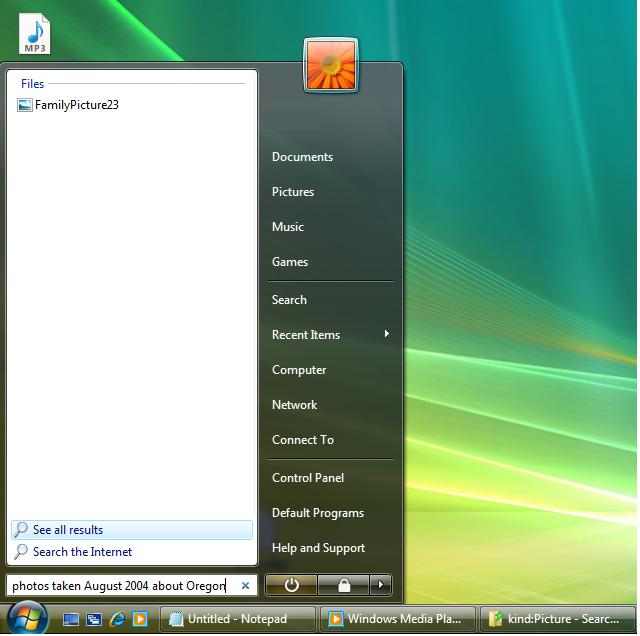
Vista provide an amazing search capapbility that was not available in XP, and it's built right in the OS.
You can search for your Music by specifying Artist, file type, Bit Rate. Pictures by the camera make, resolution, tags you specify...etc.
You can search by typing the following right in the Start Menu Search box or in any of the Search box which are all over the place
photos taken August 2004 about Oregon
The Answer: Finding your stuff
Vista provide an amazing search capapbility that was not available in XP, and it's built right in the OS.
You can search for your Music by specifying Artist, file type, Bit Rate. Pictures by the camera make, resolution, tags you specify...etc.
You can search by typing the following right in the Start Menu Search box or in any of the Search box which are all over the place
photos taken August 2004 about Oregon
Watch for posting on my blog that describe the Advance Query Syntax (AQS), and Natural Query Syntax (NQS) in great details in the near future.
Subscribe to:
Posts (Atom)


 Posts
Posts

