
- You automatically assume that every screen is a touch screen: Many times I reach to my computer screen to use the same gesture I use on my iPhone to scroll up and down
- Can't sleep without it
- Can't stop playing with the iPhone even though you already checked everything on it less than 2 minutes ago
- You can't stop using the built in stopwatch
- You don't let your iPhone ever go out of charge no matter what.
Showing posts with label Mobile. Show all posts
Wednesday, July 16, 2008
Symptoms you are addicted to your iPhone
Tuesday, June 24, 2008
Android based phones.
GPhone is a mobile phone running Google's Android operating System, with 50 top applications already been announced. Check it out!
Link
Link
Other Video Link: GPhone early preview protoype
Tuesday, June 03, 2008
iPhone 2nd generation wish list
This is what I wish Steve Jobs will announce June 9th for the iPhone 2nd Generation:-
- 3G support
- Built in GPS
- 5 MP Camera
- Video Calling, i.e. front camera
- Video recording
- Stereo Bluetooth support
Six more days from now.
Wednesday, April 02, 2008
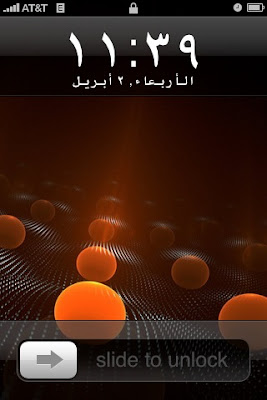
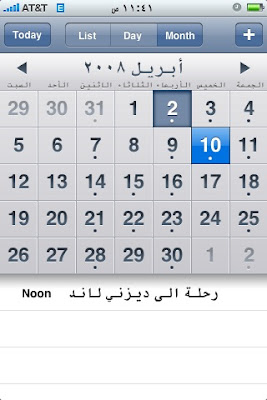
iPhone full Arabic support is here


Requirements:
1- Firmware version 1.1.3/1.1.4
2- Arabic Keyboard setup following instructions provided by Tariq @ http://www.iphoneislam.com/
1- Firmware version 1.1.3/1.1.4
2- Arabic Keyboard setup following instructions provided by Tariq @ http://www.iphoneislam.com/
Setup instructions:
1- Add the following Source in your Installer. This can be done by going to the Sources Tab, and selecting the Edit button. Then, type the following URL in the source field: http://repo.aakqtr.com/
2- After the sources are refreshed, navigate to BiOsS Modz category in the Install Tab, and select: iPhone Arabizer 1.0 and choose Install.
3- Reboot the Phone
4- At this point Safari can render the Arabic text to any Arabic website, Email, Contacts, and Calander also support Arabic text at this point
5- Go to Settings > General > International > Language: and choose Arabic (this will change your UI Language)
6- Go to Settings > General > International > Region Format and Select Arabic and the Country.
Now you have Full Arabic support in the iPhone.
1- Add the following Source in your Installer. This can be done by going to the Sources Tab, and selecting the Edit button. Then, type the following URL in the source field: http://repo.aakqtr.com/
2- After the sources are refreshed, navigate to BiOsS Modz category in the Install Tab, and select: iPhone Arabizer 1.0 and choose Install.
3- Reboot the Phone
4- At this point Safari can render the Arabic text to any Arabic website, Email, Contacts, and Calander also support Arabic text at this point
5- Go to Settings > General > International > Language: and choose Arabic (this will change your UI Language)
6- Go to Settings > General > International > Region Format and Select Arabic and the Country.
Now you have Full Arabic support in the iPhone.
Labels:
Apple,
Arabic,
iPhone,
Mobile,
Technology
Monday, July 02, 2007
I love my iPhone, here are my top 5 feature requests
- Support for MS Exchange Push Technology. including support for Hotmail
- IM client support for MSN, Yahoo, Google Talk, AOL, ...etc
- Video recording
- Media transfer via Bluetooth
- Arabic Support in the Safari Browser.
Thats it :)
Saturday, June 30, 2007
I have the iPhone now and I hate it :(
I really miss my 8525 that I sold last week in order to buy this phone.
So far this is my second day with the iPhone and I hate it so far. Here are the reasons:-
I am going to give my self another 3 days to see if I change my mind. I hope I will since I have spent $600.
So far this is my second day with the iPhone and I hate it so far. Here are the reasons:-
- Why can't I transfer photos, sounds to another phone using the Bluetooth.
- NO IM. Most phones, even low end phones have IM built in.
- No support with Exchange Mail, unless it's MAPI? Why?
- Broweser does not support Arabic text.
- The Internet browsing via Edge is exermly slow
I am going to give my self another 3 days to see if I change my mind. I hope I will since I have spent $600.
Monday, June 04, 2007
Subscribe to:
Posts (Atom)
